16×20 Print Size for EtsyExact pixel dimensions at 300 DPI — the statement piece size explained
4800×6000 pixels. 4:5 aspect ratio. Standard frame availability. Here's everything you need to set up 16×20 digital downloads that command premium pricing — plus the full 4:5 ratio pack.
Free → upload once, download 16×20 + four more 4:5 sizes.
Quick Answer
What pixel dimensions do I need for 16×20 prints at 300 DPI?
16×20 at 300 DPI — Exact Pixel Dimensions
The math is simple: multiply each dimension in inches by 300. 16 × 300 = 4800 pixels wide, 20 × 300 = 6000 pixels tall. That gives you 28.8 megapixels — any modern camera or design tool handles this comfortably.
As a JPEG, the file weighs 8-12 MB — well under Etsy's 20 MB limit per download file, even when bundled with other sizes in a ZIP.
The 4:5 aspect ratio (width is 80% of height) determines which other sizes share the same proportions. This matters because you can scale between all 4:5 sizes without cropping — your full artwork composition is preserved at every size. For more on ratios, see Etsy print ratios guide.
Why 16×20 Is a Premium Etsy Size
Large Enough for Impact
16×20 creates visual presence in living rooms and bedrooms. It's large enough to be a focal point without requiring professional framing equipment. Buyers perceive this size as a significant piece — not a throwaway print.
Standard Frame Availability
16×20 frames are stocked at IKEA, Target, Michaels, and Amazon. Buyers don't need custom framing or expensive gallery presentation. Low friction means higher conversion rates and fewer support questions about frame fit.
Price Point Sweet Spot
Most Etsy sellers price 16×20 digital downloads between $8–20. Buyers perceive high value at this range without purchase hesitation. Including 16×20 in your listing differentiates you from competitors who stop at 8×10.
The 4:5 Ratio Family — What Sizes Come With 16×20
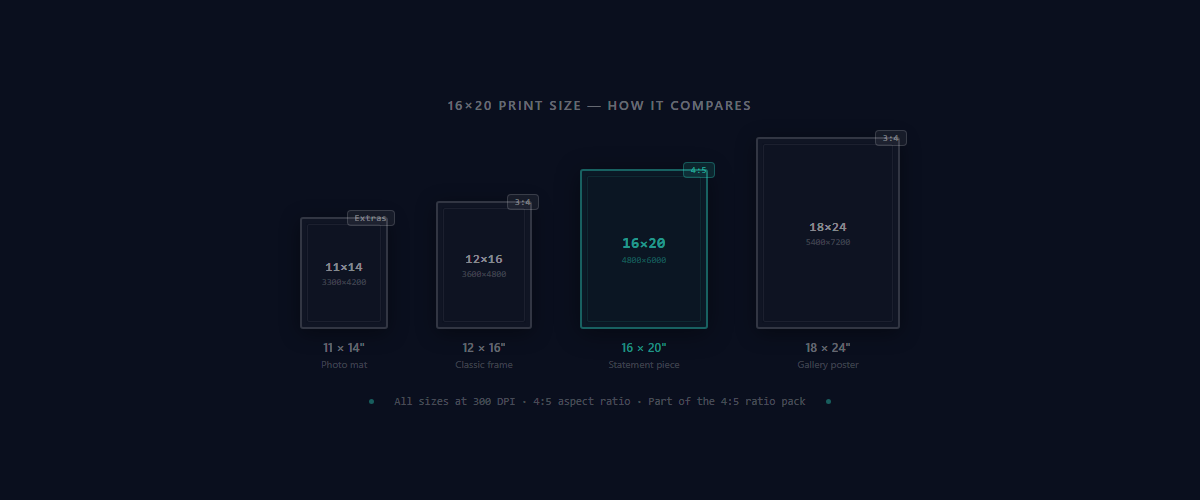
16×20 belongs to the 4:5 aspect ratio family. All sizes in this group maintain identical proportions, so you can scale up or down from the same source file without cropping. Buyers expect to receive all of these in one download.
| Print Size | Pixels @ 300 DPI | Common Use |
|---|---|---|
| 8×10 | 2400 × 3000 | #1 standard frame size |
| 12×15 | 3600 × 4500 | Mid-size statement piece |
| 16×20 Popular | 4800 × 6000 | Large wall art, gallery frames |
| 20×25 | 6000 × 7500 | Oversized focal point |
| 24×30 | 7200 × 9000 | Maximum size for most printers |
When a competitor offers “16×20 only” and your listing includes all five 4:5 sizes, yours appears to have higher value at the same price. Buyers perceive five products instead of one.
For the full picture across all ratios (2:3, 3:4, 4:5, ISO, extras), see the complete Etsy print sizes guide.
Skip the Manual Resizing
Upload your artwork once. Get 16×20 and all other 4:5 sizes at 300 DPI — organized, named, and under 20 MB.
Generate All 4:5 SizesFile Format, Color Profile & Naming
JPEG at 300 DPI
JPEG is the standard for Etsy print files. It keeps file sizes manageable (8-12 MB for 16×20) while maintaining full print quality. Avoid PNG for print files: they're 15-20 MB for this size with no visible benefit when printed. PNG bloat risks hitting the 20 MB limit when packaging multiple sizes. For more on file size management, see what files to include in Etsy digital downloads.
sRGB Color Profile
Always embed sRGB. Most home printers and online print services expect it. Files in Adobe RGB or ProPhoto RGB will shift colors during printing — reds go orange, blues go purple. In Photoshop: Edit → Convert to Profile → sRGB IEC61966-2.1. For more on print quality, see best resolution for Etsy printables.
Professional File Naming
Use clear names like artwork_16x20_300dpi.jpg. Buyers should find the right file instantly in their downloads folder. Avoid generic names like “print1.jpg” or cryptic codes.
Staying Under Etsy's 20 MB Limit
- Use JPEG, not PNG
- Flatten all layers before export
- Group by ratio pack — one ZIP per ratio stays well under 20 MB
- Or use SnapToSize — auto-optimizes every file to stay under the limit
Framing & Display Options for 16×20
16×20 prints fit directly into standard 16×20 frames with no mat required. For gallery presentation, the most common setups are matting in 20×24 or 24×30 frames, or using floating frames that add depth without matting. Mentioning these options in your listing description reduces buyer questions and increases perceived value.
Common Frame Options
Listing tip: Add “Fits any standard 16×20 frame (IKEA, Target, Amazon). For gallery presentation, mat in a 20×24 or 24×30 frame.” to your Etsy description. This single line increases buyer confidence and reduces support messages.
Common Mistakes With 16×20 Files
Exporting at 72 DPI instead of 300 DPI
72 DPI is screen resolution. A 16×20 at 72 DPI is only 1152×1440 pixels — prints will be pixelated and blurry. Always check your export settings before saving. The file must be 4800×6000 pixels. For more on DPI requirements, see best resolution for Etsy printables.
Cropping a different ratio to fit 16×20
Cropping a 2:3 or 3:4 design to 4:5 cuts off parts of the artwork. Buyers expect the full composition shown in your listing preview. Design at 4:5 from the start, or use a tool like SnapToSize that generates 4:5 sizes without cropping. And when you do want to bring 2:3 or 3:4 art into a 4:5 frame, Perfect Fit crops to 4:5 distortion-free, with you choosing what stays in frame.
Using PNG instead of JPEG
PNG files at 16×20 / 300 DPI balloon to 15-20 MB with no visible print quality benefit. This wastes ZIP space and risks hitting Etsy's 20 MB limit. Always use JPEG for print files.
Wrong color profile causing print color shifts
Files in Adobe RGB or ProPhoto RGB display incorrect colors when printed — reds appear orange, blues shift purple. Convert to sRGB before exporting. Every time.
Avoid Export Errors
Get pixel-perfect 16×20 files (and the full 4:5 pack) in seconds. No Photoshop expertise required.
Generate Sizes Instantly16×20 vs Other Popular Large Sizes
16×20 is not the only large size buyers request, but it belongs to a specific ratio family. Understanding the difference between size and ratio helps you package listings properly.
| Size | Ratio | Pixels @ 300 DPI | Use Case |
|---|---|---|---|
| 16×20 | 4:5 | 4800 × 6000 | Traditional art, portrait orientation |
| 16×24 | 2:3 | 4800 × 7200 | Wall art, poster format |
| 18×24 | 3:4 | 5400 × 7200 | Classic photo format |
Buyers don't just need multiple sizes — they need multiple ratios. A 16×20 (4:5) and a 16×24 (2:3) are not interchangeable. Position 16×20 as part of a comprehensive ratio offering, not a standalone product. For a full comparison, see 5×7 print size guide (another popular size in a different ratio).
How to Create 16×20 Without Manual Resizing
Manually resizing to 4800×6000 in Photoshop or Canva takes time, risks export errors, and requires technical knowledge of DPI settings. Multiply this across five 4:5 sizes (8×10, 12×15, 16×20, 20×25, 24×30) and you're spending 1-3 hours per artwork just preparing files.
The Manual Workflow Problem
- Resize each size manually in Photoshop or Canva
- Set correct DPI for each export (easy to forget)
- Convert color profile to sRGB for each file
- Name files professionally (manual typing)
- Package into ZIP and verify under 20 MB
This process takes 1-3 hours per artwork. For sellers with 50+ listings, that's 50-150 hours of manual work. For a step-by-step breakdown of this workflow, see how to resize images for Etsy.
SnapToSize Automates This Entirely
- Upload once → get all 4:5 sizes (8×10, 12×15, 16×20, 20×25, 24×30)
- 300 DPI guaranteed on every file
- sRGB color profile automatically applied
- Professional file naming (artwork_16x20_300dpi.jpg)
- Organized ZIP under 20 MB
- Processing time: 10-30 seconds (not 1-3 hours)
Get All 4:5 Sizes in One Click
Upload your artwork and instantly receive 8×10, 12×15, 16×20, 20×25, and 24×30 at 300 DPI. Named, 300 DPI, and ready to publish — plus the room photos to list them with.
Start Free — Generate Sizes NowFrequently Asked Questions
Exactly 4800×6000 pixels. Multiply each dimension by 300: 16×300 = 4800 pixels wide, 20×300 = 6000 pixels tall. As a JPEG, the file weighs 8-12 MB — well under Etsy's 20 MB limit.
4:5 (or 0.8 as a decimal). This ratio is shared with 8×10, 12×15, 20×25, and 24×30. All these sizes can be scaled from the same source file with your whole composition intact.
Yes — 16×20 is a standard frame size available at IKEA, Target, Amazon, and Michaels. It can also be matted inside 20×24 or 24×30 frames for gallery-style presentation.
JPEG at 300 DPI with sRGB color profile. JPEG keeps file sizes manageable (8-12 MB). Avoid PNG for print files — it creates 15-20 MB files with no print quality benefit, wasting ZIP space and risking the 20 MB limit.
Not for home printing — buyers print to exact dimensions. If your customers use professional print services, you can optionally add 0.125" bleed on all sides, making the file 4875×6075 pixels at 300 DPI.
Still exporting 16×20 files manually for every listing?
Upload once, get 16×20 plus 29 other sizes at 300 DPI. Organized in ratio packs, ready for Etsy.
Get All SizesNo account needed · No credit card required