11×14 Print Size for EtsyExact pixel dimensions at 300 DPI — the size buyers expect but sellers forget
3300×4200 pixels. 11:14 aspect ratio — not 4:5. Standard mat opening for 16×20 frames. Here's everything you need to set up 11×14 digital downloads that sell.
Free → upload once, get 11×14 + every other Etsy size at 300 DPI.
11×14 plus every other ratio, one upload, 300 DPI, named and ZIP-packed.
Quick Answer
What pixel dimensions do I need for 11×14 prints at 300 DPI?
11×14 at 300 DPI — Exact Pixel Dimensions
The calculation: multiply each dimension in inches by 300. 11 × 300 = 3300 pixels wide, 14 × 300 = 4200 pixels tall. That gives you 13.86 megapixels — any modern camera or design tool handles this comfortably.
As a JPG (also called JPEG), the file typically weighs 4–7 MB — well under Etsy's 20 MB limit, even when bundled with other sizes in a ZIP.
The critical detail most guides miss: 11:14 is not the same ratio as 4:5. The decimal ratio is 0.786 vs 0.800. That 1.8% difference means you cannot simply scale an 8×10 file to 11×14 without cropping or letterboxing. For the full DPI explanation, see the best resolution for Etsy printables guide.
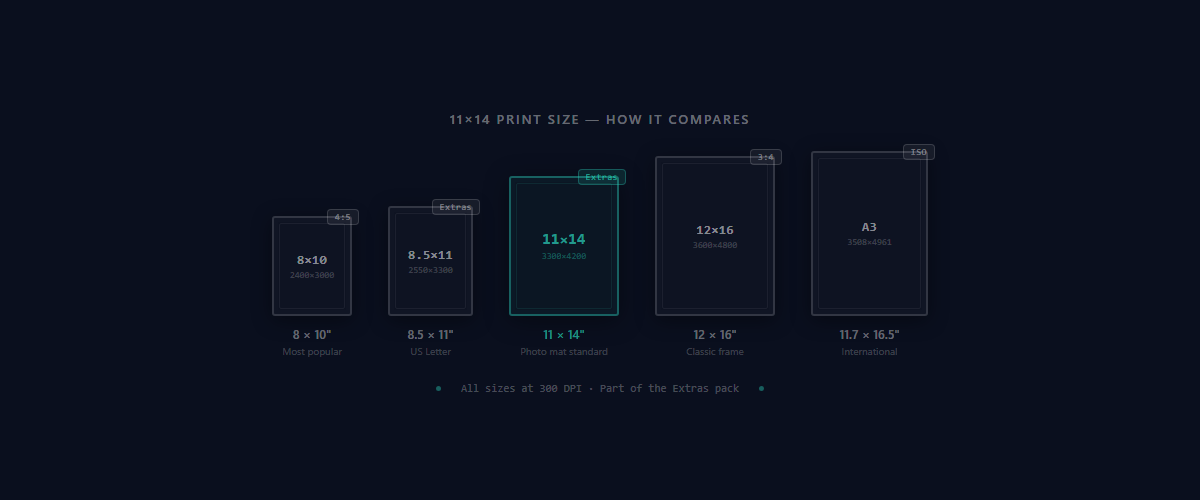
Why 11×14 Is Essential for Etsy Sellers
Universally Available Frame Size
11×14 frames are stocked at IKEA, Target, Walmart, Michaels, and Amazon. Buyers don't need to hunt for custom frames or pay premium prices. Low friction means higher conversion for your listings.
The Standard Mat Opening for 16×20 Frames
This is the detail that separates professional sellers from the rest. An 11×14 print matted inside a 16×20 frame creates the gallery-wall look buyers pay premium for. The white mat border adds perceived value and a professional finish.
The “Missing Middle” Size
11×14 bridges the gap between the common 8×10 and the large 16×20. Buyers who want something bigger than a desk frame but not a statement piece choose 11×14 for bedrooms, offices, and hallways. Sellers who skip this size lose an entire buyer segment.
11×14 Aspect Ratio — Not Exactly 4:5
This trips up Etsy sellers constantly
11:14 = 0.786 | 4:5 = 0.800. That 1.8% difference means a 4:5 image resized to 11×14 will either crop ~1.8% off the width or add thin letterbox bars. It's subtle but visible — especially with centered text or geometric designs.
Most sellers design at 4:5 (for 8×10, 16×20, etc.) and assume 11×14 is the same. It isn't. The 11:14 ratio is slightly narrower than 4:5. When you force-fit a 4:5 design into 11:14, one of two things happens:
- •Cropping: ~1.8% sliced off the left and right edges. Fine for abstract art, problematic fortypography or bordered designs.
- •Letterboxing: Thin white bars added to the top and bottom. Looks unfinished when printed.
The professional solution: create a separate 11:14 source file, or use a tool that handles ratio-aware resizing automatically. When a crop is unavoidable, Perfect Fit gives you a controlled, distortion-free crop to the 11:14 ratio — you choose what stays in frame instead of letting a force-fit stretch the image. For a deeper dive on all Etsy ratios, see the Etsy print ratios guide.
Skip the Ratio Math
Upload your artwork once. SnapToSize generates pixel-perfect 11×14 files (and every other Etsy size) at 300 DPI. No cropping guesswork.
Generate All Sizes InstantlySizes That Pair With 11×14
Buyers don't purchase one size in isolation. They plan gallery walls, matching sets, and room arrangements. The strongest Etsy listings bundle 11×14 with complementary sizes that cover the most common frame options.
The Seller Trifecta: 8×10 + 11×14 + 16×20
For gallery wall sets, buyers combine 11×14 with smaller 5×7 and 8×10 prints in a curated arrangement. Including all three sizes in one listing makes your download pack the obvious choice over competitors offering single sizes.
Note the ratio grouping: 8×10 and 16×20 share the 4:5 ratio, while 11×14 sits in its own 11:14 group. This means you need at least two source compositions — one for 4:5 and one for 11:14. For guidance on how many sizes to offer per listing, see how many sizes to include in an Etsy printable.
Sellers expanding to larger formats often add 18×24 and 24×36 for buyers who want large-scale statement pieces. Covering small through large sizes in one listing maximizes perceived value.
For a broader overview of what files buyers expect, check what files to include in an Etsy digital download. For the full list of all Etsy print sizes and their pixel dimensions, see the complete Etsy print sizes guide.
File Format, Color Profile & Naming
JPG / JPEG at 300 DPI
JPG (also called JPEG) is the standard for Etsy print files. At 11×14, a JPEG typically weighs 4–7 MB — well under Etsy's 20 MB limit, even when bundled with other sizes. PNG files are typically 3–5× larger with no visible print quality benefit.
sRGB Color Profile
Always embed sRGB IEC61966-2.1. Most home printers and online print services expect it. Files in Adobe RGB or ProPhoto RGB will shift colors when printed — reds go orange, blues go purple. In Photoshop: Edit → Convert to Profile → sRGB.
Professional File Naming
Use clear names like artwork_11x14_300dpi.jpg. Buyers should find the right file instantly in their downloads folder. Avoid generic names like “print1.jpg” or version numbers that mean nothing to customers.
Staying Under Etsy's 20 MB Limit
- Use JPEG, not PNG — 3–5× smaller files
- Flatten all layers before export
- Group by ratio — 11:14 files in one ZIP, 4:5 files in another
- Or use SnapToSize — auto-optimizes and organizes every file
Framing & Matting Options for 11×14
11×14 is one of the most versatile frame sizes. It works as a standalone framed print or — more commonly — as the matted centerpiece of a 16×20 frame. Mentioning specific frame options in your listing description reduces buyer hesitation and increases perceived value.
Frame + Mat Combinations
Where Buyers Find 11×14 Frames
Listing tip: Add “Fits any standard 11×14 frame (IKEA RIBBA, Target, Amazon). For a gallery look, mat in a 16×20 frame.” to your Etsy description. This single line reduces buyer questions and builds confidence.
Common Mistakes With 11×14 Files
Assuming 11×14 is the same ratio as 8×10
8×10 is 4:5 (0.800). 11×14 is 11:14 (0.786). Resizing a 4:5 file to fit 11×14 crops about 1.8% off the edges. For text-heavy or bordered designs, this cuts into your composition. Always create a separate 11:14 export.
Exporting at 72 DPI instead of 300 DPI
72 DPI is screen resolution. An 11×14 at 72 DPI is only 792×1008 pixels — prints will be pixelated and blurry. The file must be 3300×4200 pixels. Always verify pixel dimensions before uploading.
Not including 11×14 at all
11×14 is one of the top 5 most-requested print sizes. 80% of US university diplomas are 11×14, so most households already own frames this size. Sellers who skip it lose buyers to competitors who include it.
Wrong color profile
Files in Adobe RGB or ProPhoto RGB display incorrect colors when printed — reds appear orange, blues shift purple. Convert to sRGB before exporting. Every time.
Never Export the Wrong Dimensions
Get 3300×4200 px files (and every other Etsy size) in seconds. No manual math required.
Try SnapToSize FreeHow to Create 11×14 Without Manual Resizing
The manual workflow is painful: calculate 3300×4200, remember that 11:14 isn't 4:5, export separately from your 4:5 sizes, manage two ratio groups, name every file, verify pixel dimensions, then ZIP everything under 20 MB.
Multiply that by every listing and every new artwork. Most sellers either skip 11×14 entirely (losing buyers) or force-fit their 4:5 files (delivering cropped artwork).
SnapToSize handles all of this from one upload. It detects your source ratio, generates correct 11×14 files at 3300×4200 px, exports every other Etsy size at 300 DPI, names files professionally, and keeps everything under the file limit. For the full resizing workflow, see how to resize images for Etsy.
Add 11×14 to Every Listing
Upload once, get 11×14 plus all popular Etsy sizes at 300 DPI. Production-ready files in seconds, not hours. See pricing for Pro features.
Start Free — Generate Sizes NowFrequently Asked Questions
3300×4200 pixels exactly. Multiply each dimension by 300: 11×300 = 3300 pixels wide, 14×300 = 4200 pixels tall. Typical JPEG file size: 4-7 MB — well under Etsy's 20 MB limit.
11:14 (0.786 decimal). This is NOT 4:5 (0.800). A 4:5 image resized to 11×14 requires minor cropping — about 1.8% off the width. You need a separate 11:14 export or accept slight cropping from a 4:5 source.
Yes — 11×14 is one of the most common US frame sizes. Available at IKEA (RIBBA, FISKBO), Target, Walmart, Michaels, and Amazon. It's also the standard mat opening for 16×20 frames.
Yes. It's one of the top 5 most-requested print sizes. Listings that include 11×14 alongside 8×10 and 16×20 convert better because buyers have the exact size they need.
Not directly. 8×10 is 4:5 ratio; 11×14 is 11:14. Only stretching distorts the image — a crop just trims the edges. You need either a separate 11:14 export or a controlled crop from the 4:5 source. SnapToSize's Perfect Fit gives you a distortion-free crop to the 11:14 ratio where you choose what stays in frame.
Still exporting 11×14 files manually for every listing?
Upload once, get 11×14 plus 29 other sizes at 300 DPI. Organized in ratio packs, ready for Etsy.
Get All SizesNo account needed · No credit card required