20×30 Print Size for EtsyExact pixel dimensions at 300 DPI — the largest standard 2:3 poster size
6000×9000 pixels. 2:3 aspect ratio. Standard poster frame everywhere. Here's how to set up 20×30 digital downloads that sell — plus the full 2:3 ratio family.
Free → upload once, get all seven 2:3 sizes at 300 DPI.
Quick Answer
What pixel dimensions for 20×30 at 300 DPI?
20×30 at 300 DPI — Exact Pixel Dimensions
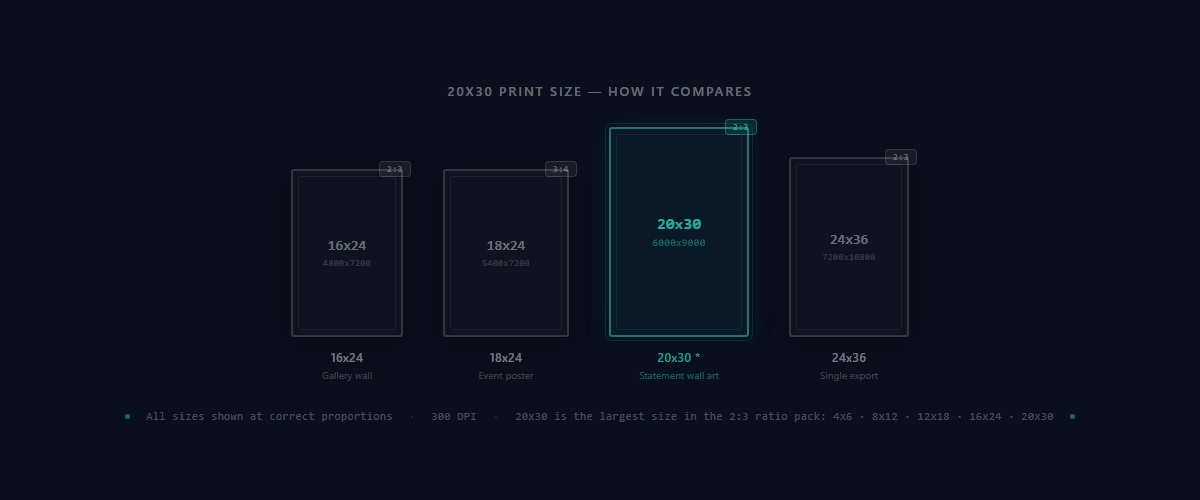
The math is straightforward: 20 × 300 = 6000 pixels wide, 30 × 300 = 9000 pixels tall. That gives you a 54-megapixel file — large enough for razor-sharp detail at full poster size.
As a JPG (also called JPEG), the file stays well under Etsy's 20 MB upload limit, even when bundled with other sizes in a ZIP pack.
The 2:3 aspect ratio (width is 66.7% of height) means 20×30 shares identical proportions with six other sizes — from 4×6 postcards all the way up. One source image scales across all of them without cropping. For a deeper look at how ratios work, see the Etsy print ratios guide.
Why 20×30 Is a Must-Have for Etsy Wall Art
Largest Size in the 2:3 Pack
20×30 is the largest standard 2:3 poster size you'll find at every major retailer. The only bigger option in the same ratio is 24×36. Together they cover everything from 4×6 postcards to oversized statement pieces.
Standard Poster Frame — Zero Buyer Friction
20×30 poster frames are stocked at Target, Walmart, IKEA, Michaels, and Amazon in the $10-30 range. When buyers know they can frame it easily, they buy with confidence. Mention frame availability in your listing description to reduce hesitation.
Premium Pricing Opportunity
Large-format listings with multiple sizes command higher prices. Buyers who want 20×30 are decorating living rooms, bedrooms, and offices — they're serious art buyers, not casual browsers. Multi-size packs with 20×30 typically price at $12-25+.
The 2:3 Ratio Family — All 7 Sizes With 20×30
20×30 belongs to the 2:3 aspect ratio family. All seven sizes share identical proportions, so they scale from one source image without any cropping. Buyers expect all of these in one download — see how many sizes to include for more on perceived value.
| Print Size | Pixels @ 300 DPI | Common Use |
|---|---|---|
| 4×6 | 1200 × 1800 | Postcards, small frames |
| 6×9 | 1800 × 2700 | Small wall art |
| 8×12 | 2400 × 3600 | Photo print standard |
| 10×15 | 3000 × 4500 | Mid-size wall art |
| 12×18 | 3600 × 5400 | Small poster size |
| 16×24 | 4800 × 7200 | Large wall art |
| 20×30Popular | 6000 × 9000 | Statement piece poster |
All seven sizes share the 2:3 ratio, so one high-resolution source file produces the entire set. For a comparison of how the 2:3 family stacks up against 8×10 and the 4:5 family, see 2:3 vs 4:5 ratio guide.
For the complete breakdown across all five ratio packs, visit the full Etsy print sizes reference.
Get All 7 Sizes in One Upload
Upload your artwork once. Receive 4×6, 6×9, 8×12, 10×15, 12×18, 16×24, and 20×30 — all at 300 DPI, professionally named, and organized in a ZIP under 20 MB.
Generate All 2:3 Sizes20×30 vs 24×36 — Which Large Size Should You Include?
Both are 2:3 ratio. Both are standard poster sizes. The difference is how you get them.
| 20×30 | 24×36 | |
|---|---|---|
| Pixels | 6000 × 9000 | 7200 × 10800 |
| Ratio | 2:3 | 2:3 |
| In ZIP Pack? | Yes — 2:3 pack | No — single export only |
| Frame Availability | Standard, widely stocked | Standard, very widely stocked |
| Best For | Large wall art | Biggest poster size |
Recommendation: Include both. You get 20×30 automatically in the 2:3 pack, then add 24×36 via single export. This gives buyers the full range of large-format wall art options.
File Format, Color Profile & Professional Naming
JPG / JPEG at 300 DPI
JPG (also called JPEG) is the standard for Etsy print files. At 6000×9000 pixels, PNG files become extremely large and risk hitting Etsy's 20 MB limit. JPG keeps file sizes manageable with no visible quality loss for prints. See the file format guide for more detail.
sRGB Color Profile
Always embed sRGB IEC61966-2.1. Most home printers and online print services expect it. Files in Adobe RGB or ProPhoto RGB shift colors during printing — reds appear orange, blues turn purple.
Professional File Naming
Use clear names like artwork_20x30_300dpi.jpg. Buyers should find the right file instantly in their downloads folder. SnapToSize handles naming automatically and organizes files by ratio in ZIP packs.
Staying Under Etsy's 20 MB Limit
- Use JPG, not PNG — PNG at this resolution creates files that often exceed the limit
- Flatten all layers before export
- Group by ratio pack — one ZIP per ratio stays well under 20 MB
- Or use SnapToSize — auto-optimizes every file to stay under the limit
For more detail, see the Etsy 20 MB file limit guide.
Framing & Display — Where Buyers Print 20×30
20×30 poster frames are available at every major retailer in the $10-30 range. This is the most common size for above-the-sofa living room art and bedroom statement pieces.
Common Display Options for 20×30
Listing tip: Add “Fits standard 20×30 poster frames (Target, IKEA, Amazon). For a gallery look, mat in a 24×36 frame.” to your Etsy description. This reduces buyer hesitation and increases purchase confidence.
Common Mistakes With 20×30 Files
Exporting at 72 DPI instead of 300 DPI
72 DPI is screen resolution. A 20×30 at 72 DPI produces only 1440×2160 pixels — the print will be visibly pixelated and blurry. Always verify your export is 6000×9000 pixels. See best resolution for Etsy printables.
Source image too small
You need at least 6000×9000 pixels to fill 20×30 at 300 DPI without upscaling artifacts. Stretching a 3000×4500 source to 6000×9000 will produce soft, blurry output. Start with a high-resolution source file.
Using PNG at this resolution
PNG files at 6000×9000 become very large and risk exceeding Etsy's 20 MB upload limit. JPG delivers identical print quality at a fraction of the file size. See best file format for Etsy printables.
Forcing the wrong ratio into 20×30
Cropping an 8×10 (4:5) or 18×24 (3:4) design to fit 20×30 (2:3) cuts off edges of your artwork. Design at 2:3 from the start, or use a tool that generates each ratio separately without cropping. When you do need a 2:3 crop, Perfect Fit gives you controlled, distortion-free crop-to-2:3 so you decide exactly which margins go. See fixing blurry Etsy prints.
Skip the Export Guesswork
Get pixel-perfect 20×30 files (and the full 2:3 pack) in seconds. No DPI settings to configure. No format mistakes.
Generate Sizes InstantlyHow to Create 20×30 Without Manual Resizing
Manually creating a 6000×9000 file for each artwork, then repeating for six other 2:3 sizes, takes 1-3 hours per design. Multiply by dozens of artworks in your shop and it becomes the bottleneck that limits growth.
SnapToSize generates all 7 sizes in the 2:3 pack (including 20×30) in seconds from one upload. Plus 4 more ratio packs — up to 70 print-ready files total, in both portrait and landscape orientations. Every file is at 300 DPI, professionally named, and organized in ZIPs under 20 MB.
No DPI settings. No ratio math. No manual resizing. Upload once, download everything, list on Etsy.
Get the Full 2:3 Pack From One Upload
Upload your artwork and instantly receive the 2:3 pack (4×6 through 20×30) plus 4 more ratio packs — up to 70 print-ready files from one upload. Named, 300 DPI, and ready to publish — plus the room photos to list them with.
Try Free — Generate Sizes NowFrequently Asked Questions
6000×9000 pixels. Multiply each dimension by 300: 20×300 = 6000 pixels wide, 30×300 = 9000 pixels tall. This is the standard for professional print quality.
2:3 (0.667 decimal). The same ratio as 4×6, 6×9, 8×12, 10×15, 12×18, and 16×24. All 7 sizes scale from the same source image with your whole composition intact.
Yes. 20×30 is a standard poster frame size available at Target, Walmart, IKEA, Michaels, and Amazon. Buyers can also mat a 20×30 print inside a 24×36 frame for a gallery look.
Both. 20×30 is included automatically in the 2:3 ratio pack (7 sizes). 24×36 is available via single export. Together they cover the full range of large-format wall art demand.
JPG (also called JPEG) at 300 DPI with sRGB color profile. PNG at 6000×9000 creates very large files that risk exceeding Etsy’s 20 MB upload limit. JPG is compatible with every print service.
At least 6000×9000 pixels. Most professional design tools (Photoshop, Illustrator, Procreate) can export at this resolution. If your source is smaller, the print will lose sharpness at full size.
Still exporting 20×30 files manually for every listing?
Upload once, get 20×30 plus 29 other sizes at 300 DPI. Organized in ratio packs, ready for Etsy.
Get All SizesNo account needed · No credit card required